MineServer Admin
In development
Coming soon Windows · macOS · Linux · Any browser

Run your Minecraft server from one screen. At your desk, or from your phone.

MineServer Admin is a control panel for the Minecraft server you already have. Drop in one small plugin and run it from your phone, any browser or the desktop app: console, players, whitelist, settings, plugins and mods, without a terminal or a properties file. We don't host servers. Yours stays with your host, or on your own computer.

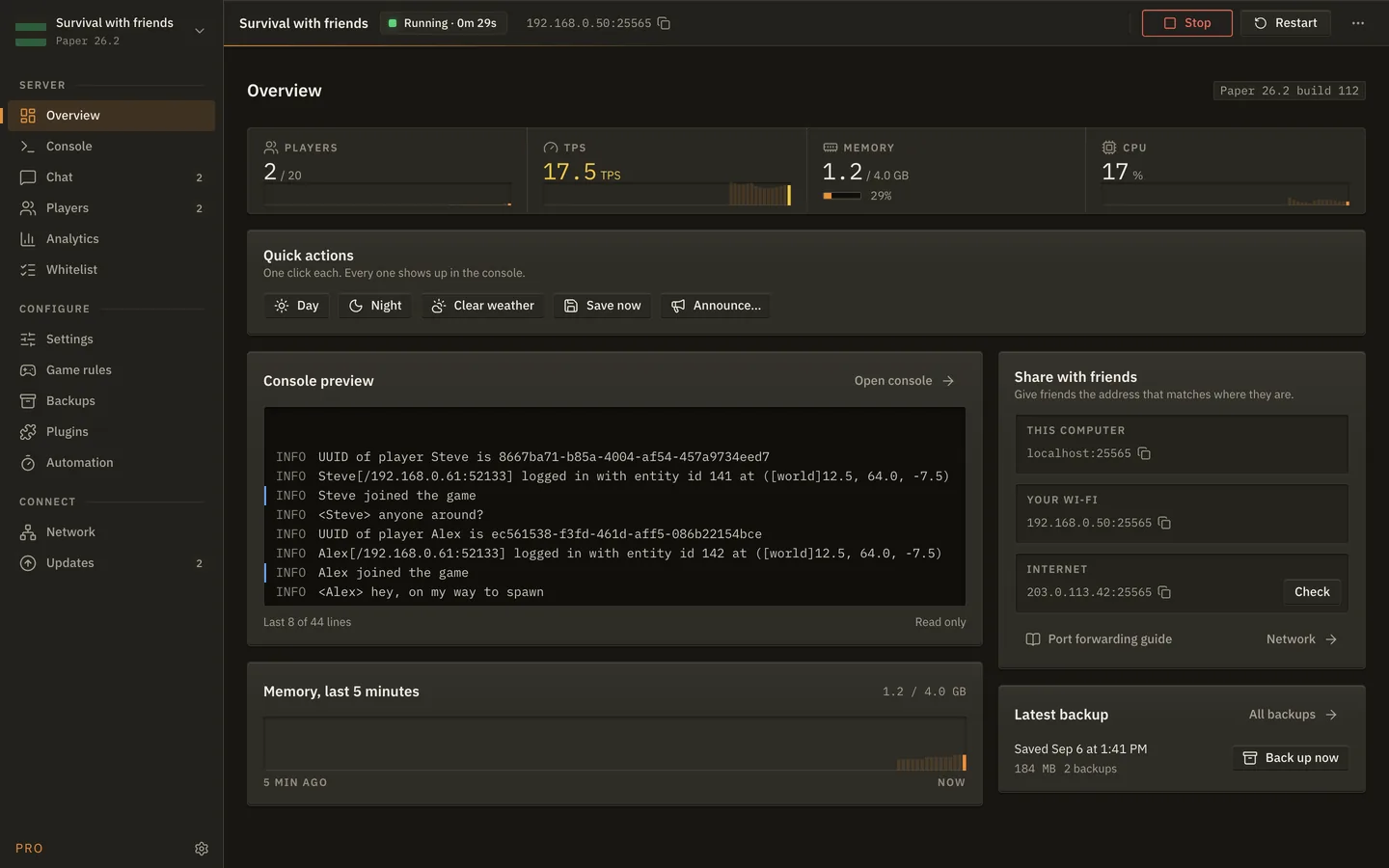
The MineServer Admin Overview screen: players, TPS, memory and CPU, quick actions, a console preview and a memory chart
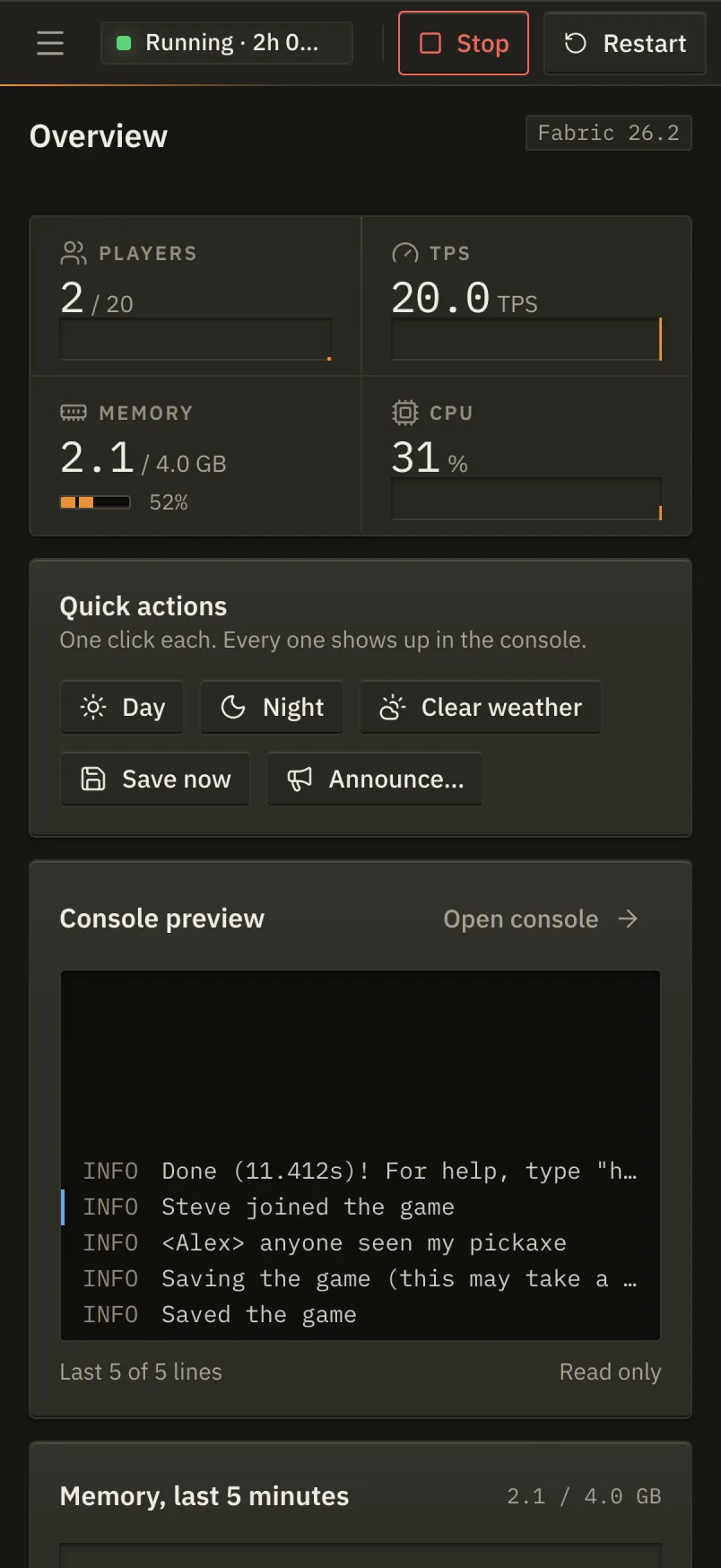
The same Overview screen in the web panel on a phone
Server softwarePaperVanillaFabricNeoForge Hosting panelsMulticraftPterodactylPelicanAny host with a file manager Plugins and modsModrinth
Not a host. A better panel for the server you have.

Same panel, wherever your server lives.

Most people rent a Minecraft server from a host and get a bare panel with it. Some run one on the computer under the desk. MineServer Admin is the control room for both, and it never moves your server anywhere.

Desktop appWindows · macOS · Linux

For a server on your own computer.

The app fetches the server software and a matching Java, writes the config, and runs the server as its own process. Setup, console, players, backups and the network screen that shows friends how to get in, all in one window.

  • Sets up a new server in minutes, or imports one you already have
  • Backups, restores and Java, handled on the machine itself
  • Free for one server. Pro adds the plugin manager and automation
AccountNone needed
PriceFree · Pro monthly
Web panelAny browser · Phone first

For a server hosted anywhere.

Drop one small mod into the server, pair it with one command, and the panel opens in your browser. The mod dials out, so there is nothing to forward and no address to find, and because it runs inside the server it sees players the moment they join.

  • Works with any host: Multicraft, Pterodactyl, Pelican and the rest
  • Invite people as operator or viewer, with every change written down
  • Sign in with a link, a passkey or an authenticator app. No password
AccountEmail sign in
PriceFree · Pro monthly
One account, three ways in. The same server shows up on your phone, in a browser and in the desktop app, and the desktop app can also set up and run a server on your own computer if you would rather not rent one.
Web panelComing soon

Your hosted Minecraft server, on your phone, in about a minute.

Hosting panels give you a file manager and a console and not much else. The plugin turns that into the full panel: live stats, a console you can read, players, whitelist, settings, game rules, plugins and mods, from the browser you already have open. Your server stays with your host; only the controls move.

  1. 01

    Drop the jar in

    One file, in mods or plugins, through your host's file manager. There is a build for each server type.

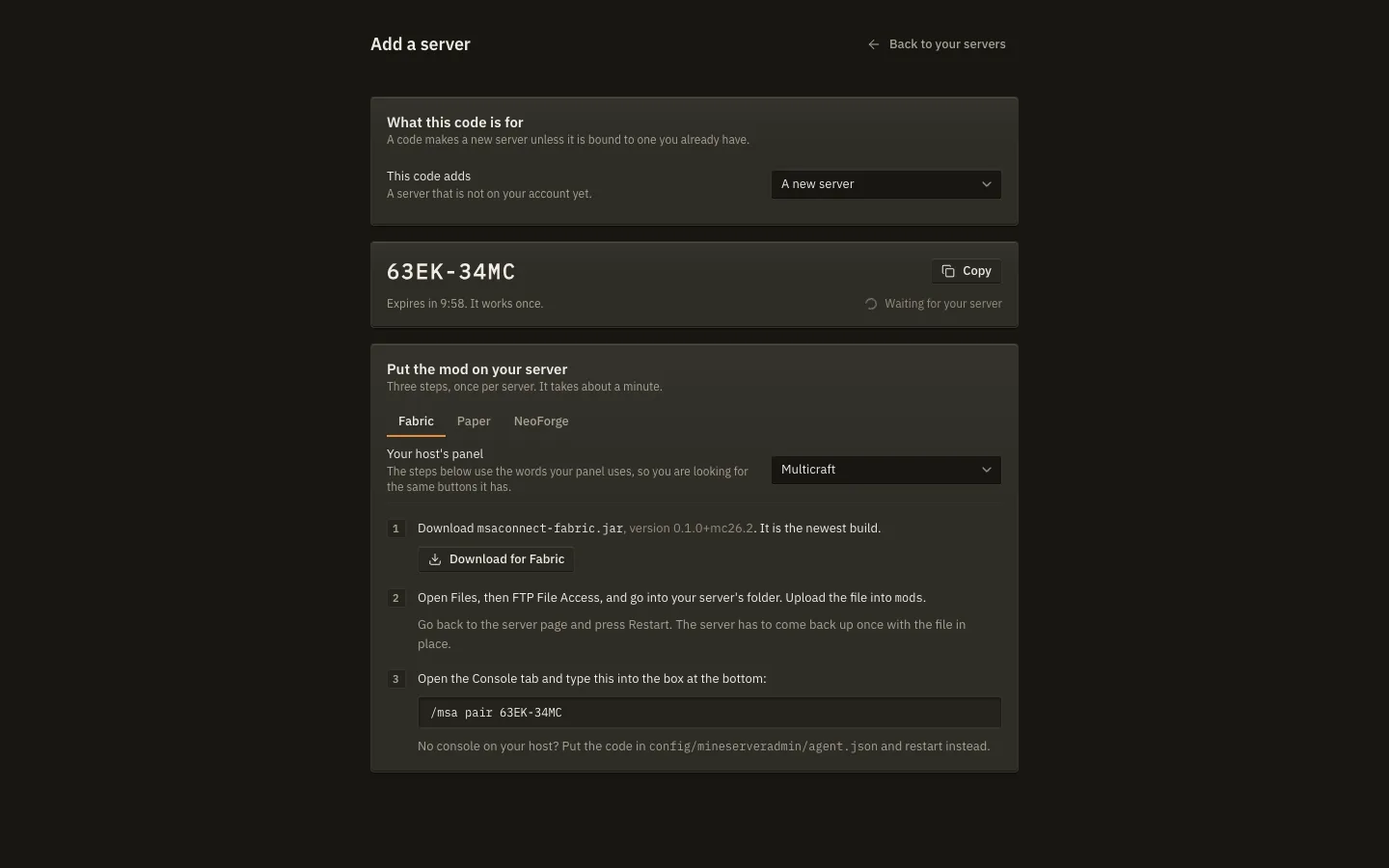
    msaconnect-fabric.jarmsaconnect-paper.jarmsaconnect-neoforge.jar

    The panel's Add a server page always has the newest build. At launch the plugin is also listed on Modrinth, CurseForge, Hangar and SpigotMC.

  2. 02

    Pair it with one command

    Restart, then type /msa pair 63EK-34MC into your host's console with the code the panel shows you. No console on your host? Put the code in a file instead.

  3. 03

    Open it anywhere

    The server appears on your account within seconds. Open it on your phone, invite a friend to help run it, and leave the host's panel for the things only it can do.

  • Nothing to forward. The mod makes one outbound connection to the panel, the way a browser does. Your server's address is never exposed by it.
  • Roles. Owners invite; operators run the server day to day; viewers see everything and change nothing. Every change is in the audit log with who did it.
  • Honest about what it can't do. A mod inside the server cannot start a stopped server or take a backup of the machine, so those buttons are simply not there. Everything else is.
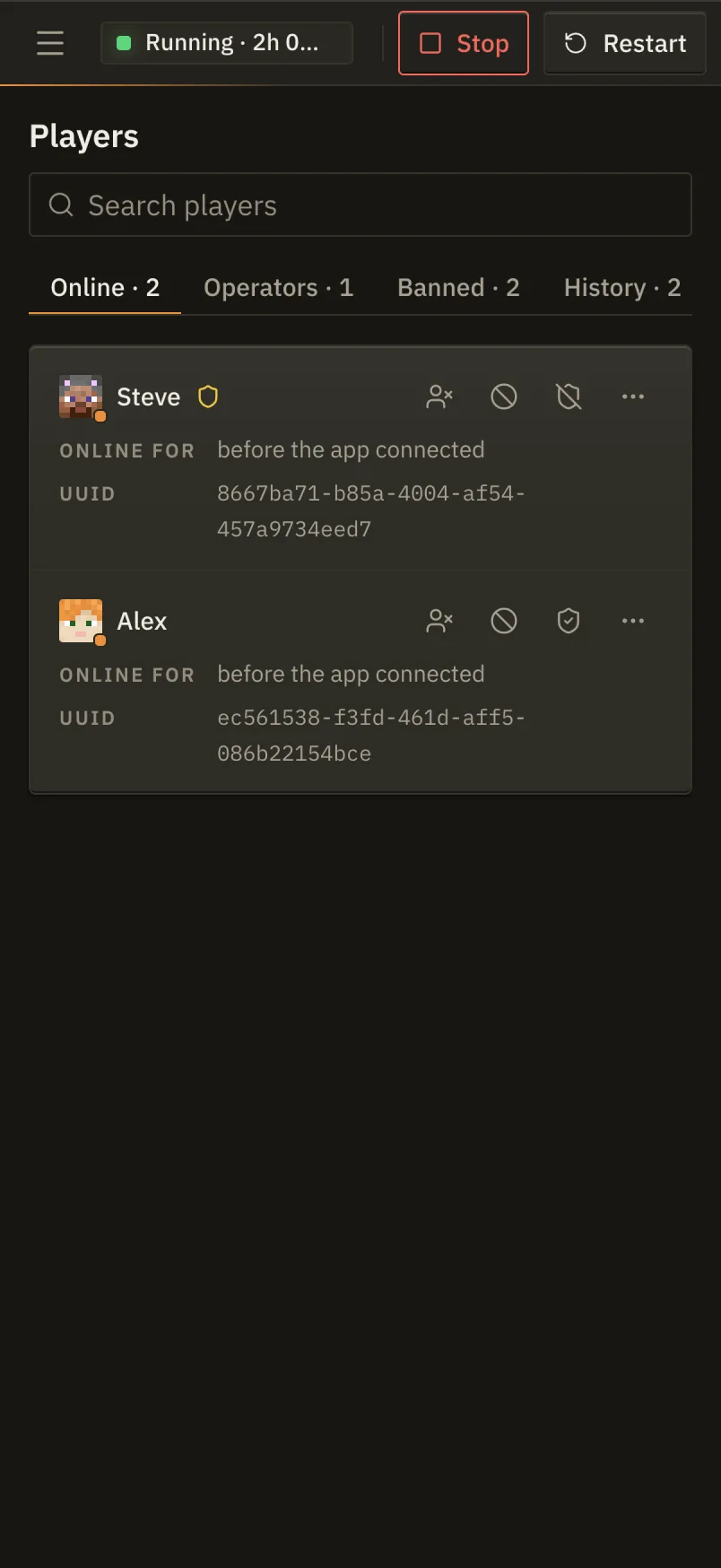
The Players screen of the web panel on a phone
The Overview screen of the web panel on a phone
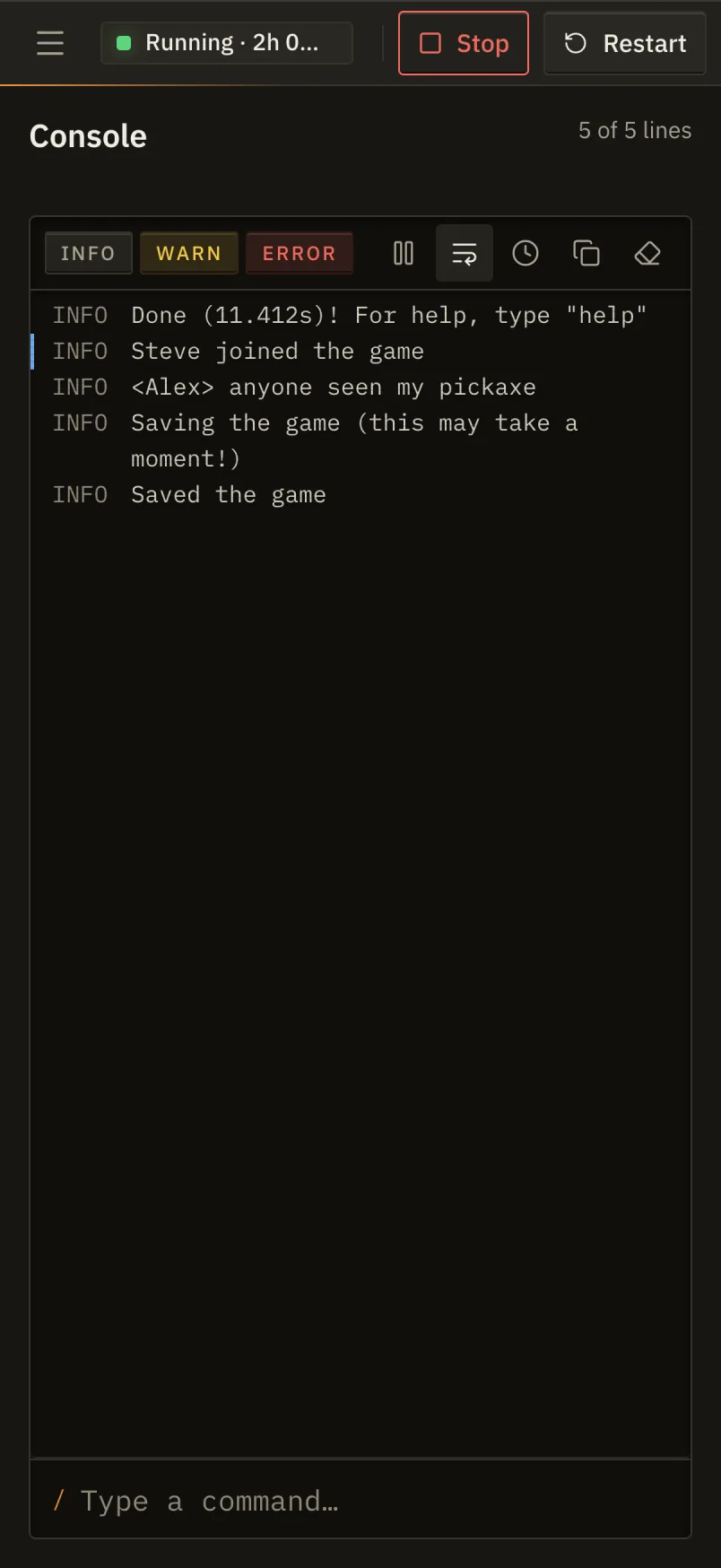
The Console screen of the web panel on a phone
The Add a server screen of the web panel, with a pairing code and the three install steps for Fabric on a Multicraft host
Adding a server. The steps use your host's own words for its file manager, restart button and console.
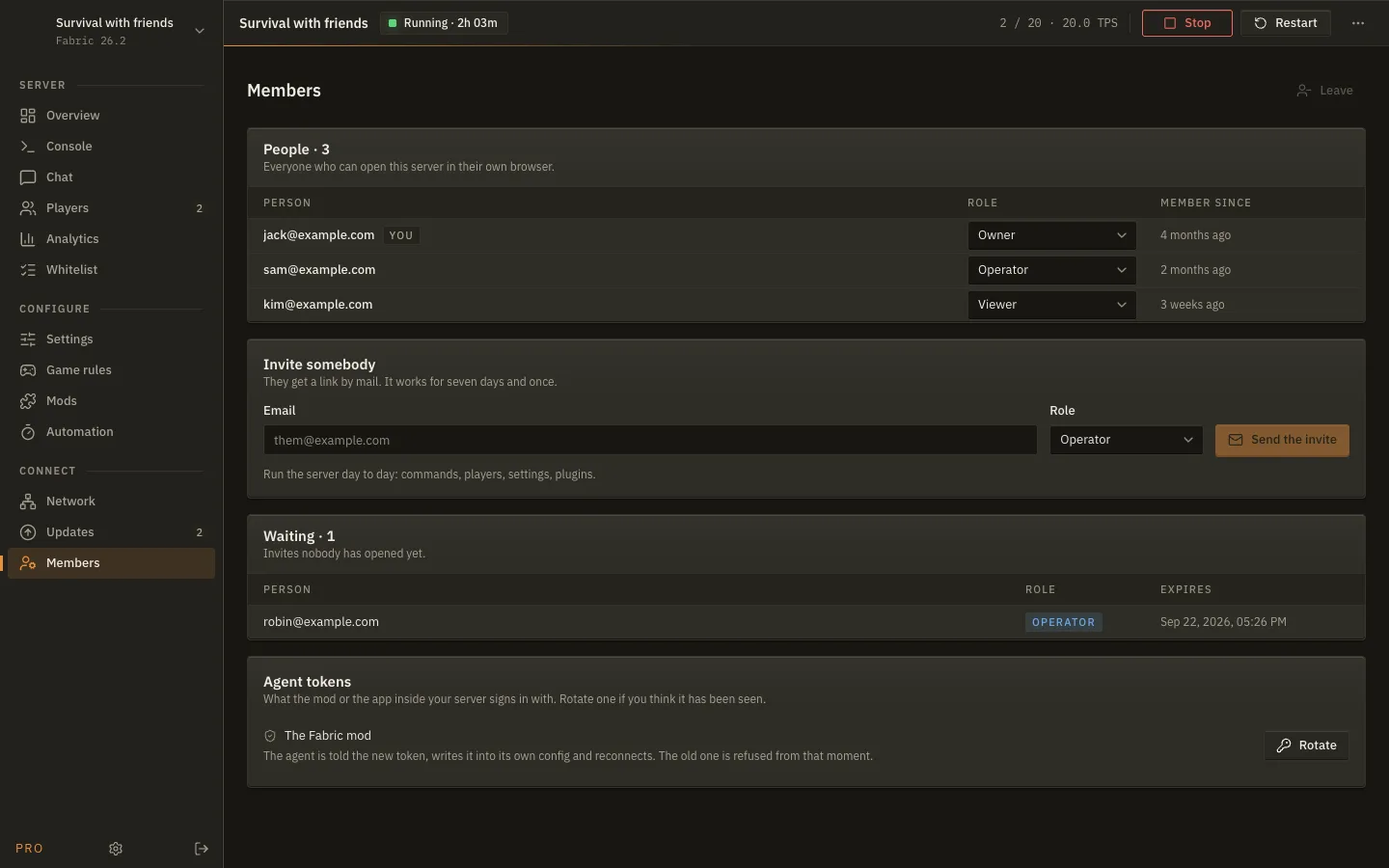
The Members screen of the web panel: people on the server, their roles, an invite form and the agent token
Members. Invite by email, set a role, and rotate the mod's token if you ever think it has been seen.
Every screen

Fourteen screens. What each one does, and where it works.

The sidebar is the whole app. Pick a tab to see it. Nearly every screen is the same in the desktop app and in the browser; the tags say where. These are real screens from a build in development, so small things may still move.

Server Configure Connect
DesktopBrowser

Overview: The whole server on one screen.

Players, TPS, memory and CPU in four instruments, with the last lines of the console, the three addresses friends connect to, and the latest backup. Quick actions for day, night, clear weather, save and an announcement, each one click.

The Overview screen of MineServer Admin
DesktopBrowser

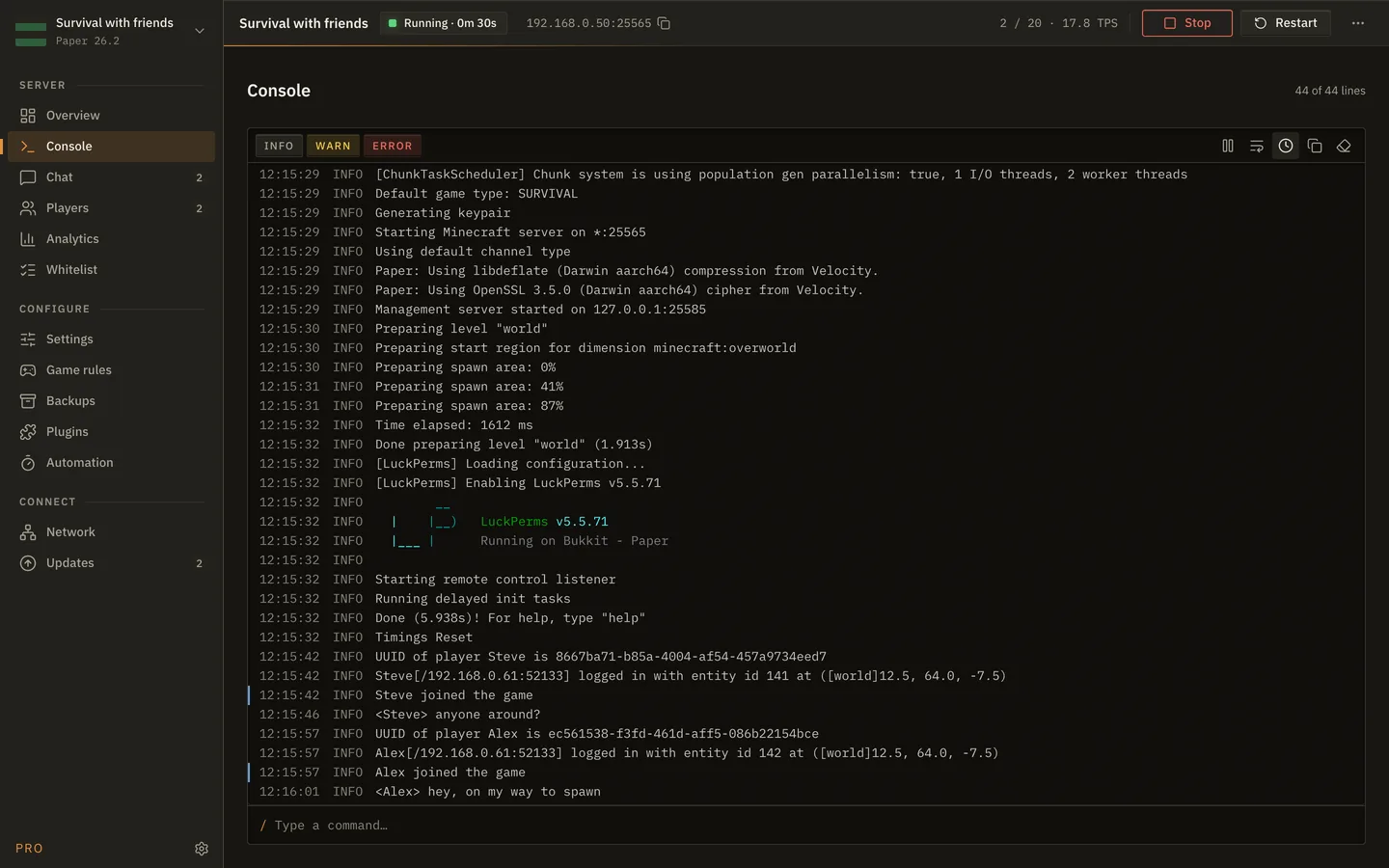
Console: A console you can read.

Every line the server prints, with INFO, WARN and ERROR filters, timestamps, pause and copy. Type a command at the bottom and the app completes it and keeps a history of what you ran. Plugin colours are kept.

The Console screen of MineServer Admin
DesktopBrowser

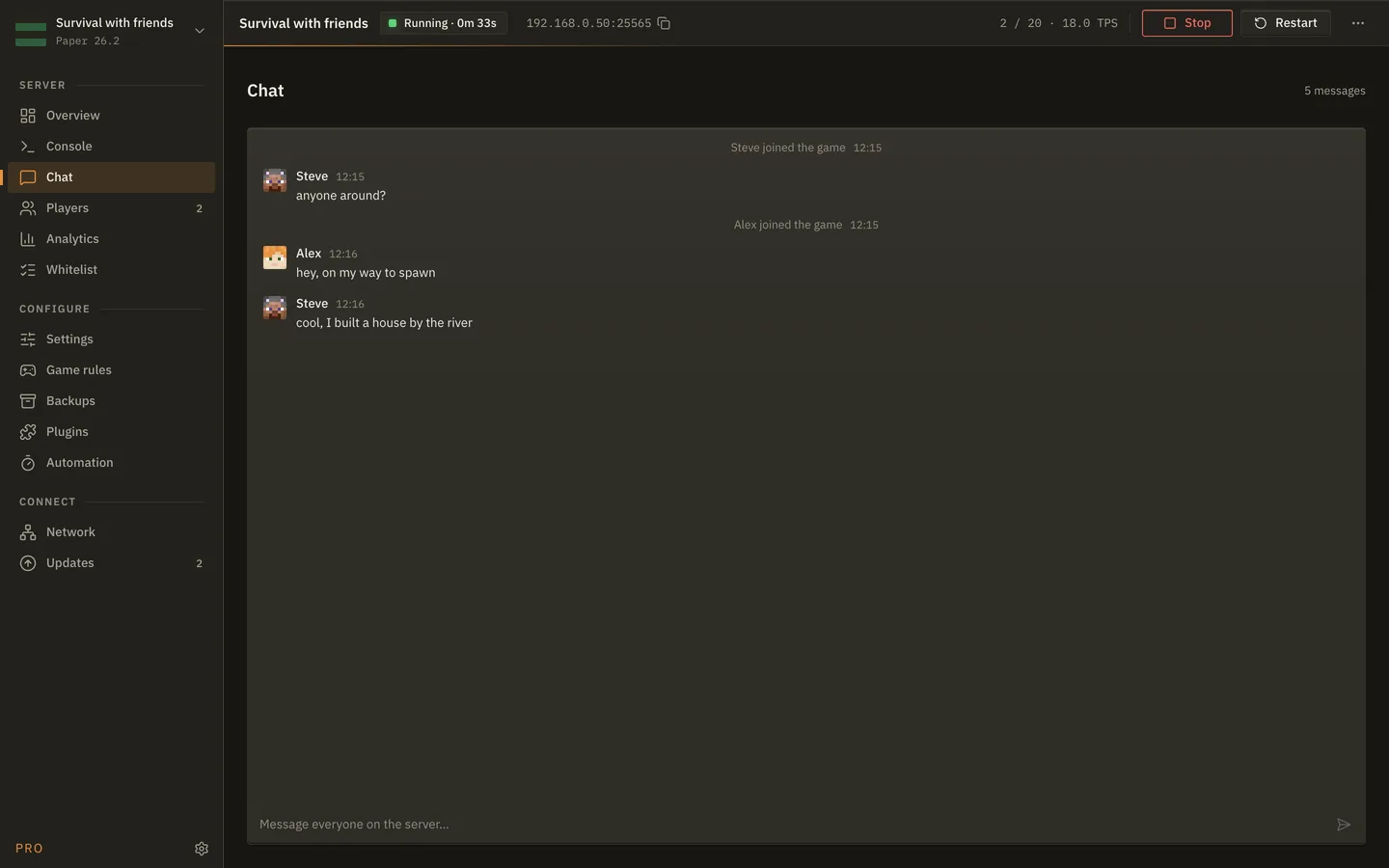
Chat: Talk to players without joining.

Read what people are saying and answer as the server. Joins and leaves show inline, and a badge on the sidebar tells you something was said while you were on another screen.

The Chat screen of MineServer Admin
DesktopBrowser

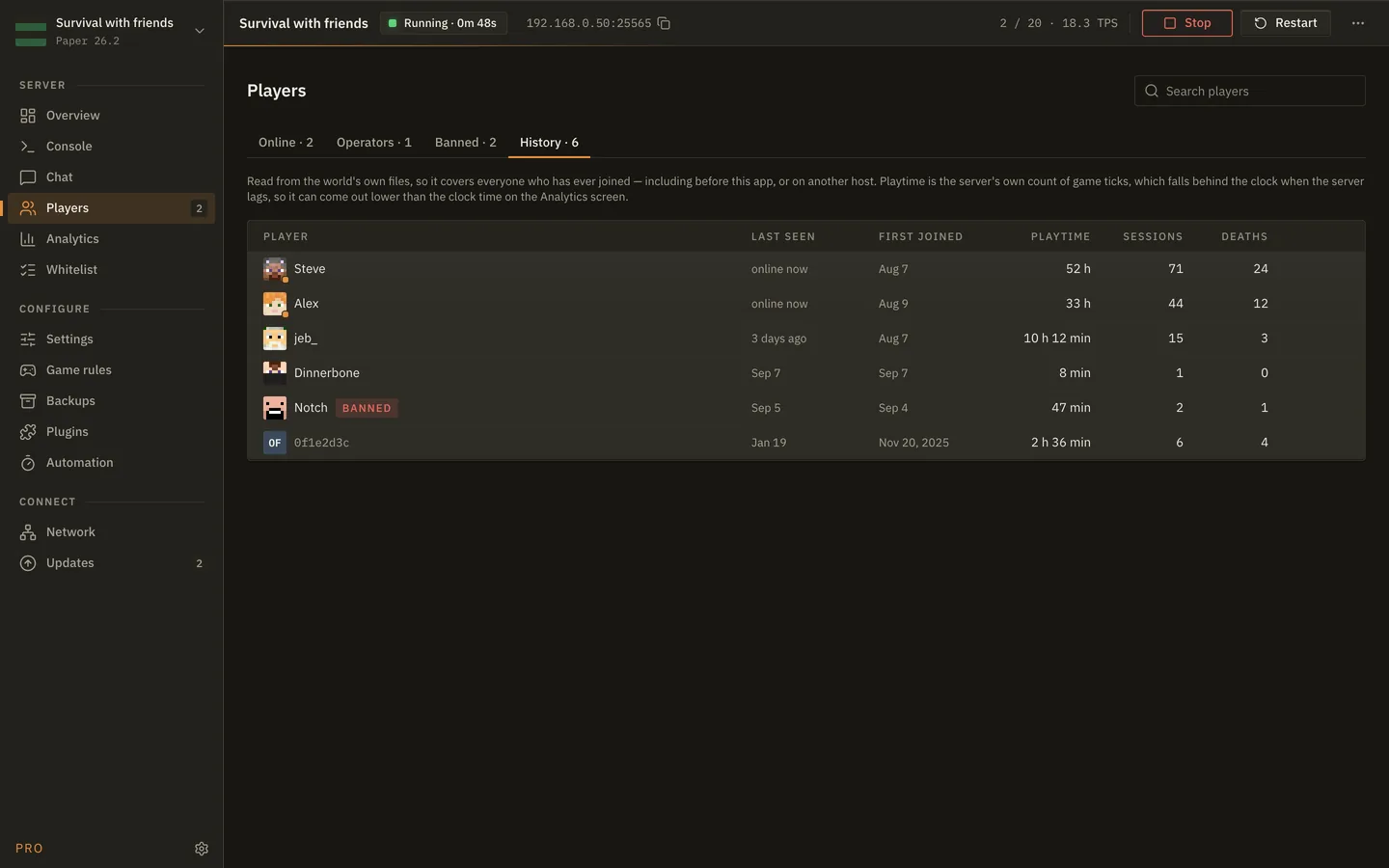
Players: Everyone, online now or ever.

Who is on, who has op, who is banned, and everyone who ever joined with playtime, sessions, deaths and last seen. Kick, ban, op, teleport or change game mode from the row. Click a name for a profile with stats, inventory, records and advancements.

The Players screen of MineServer Admin
DesktopBrowser

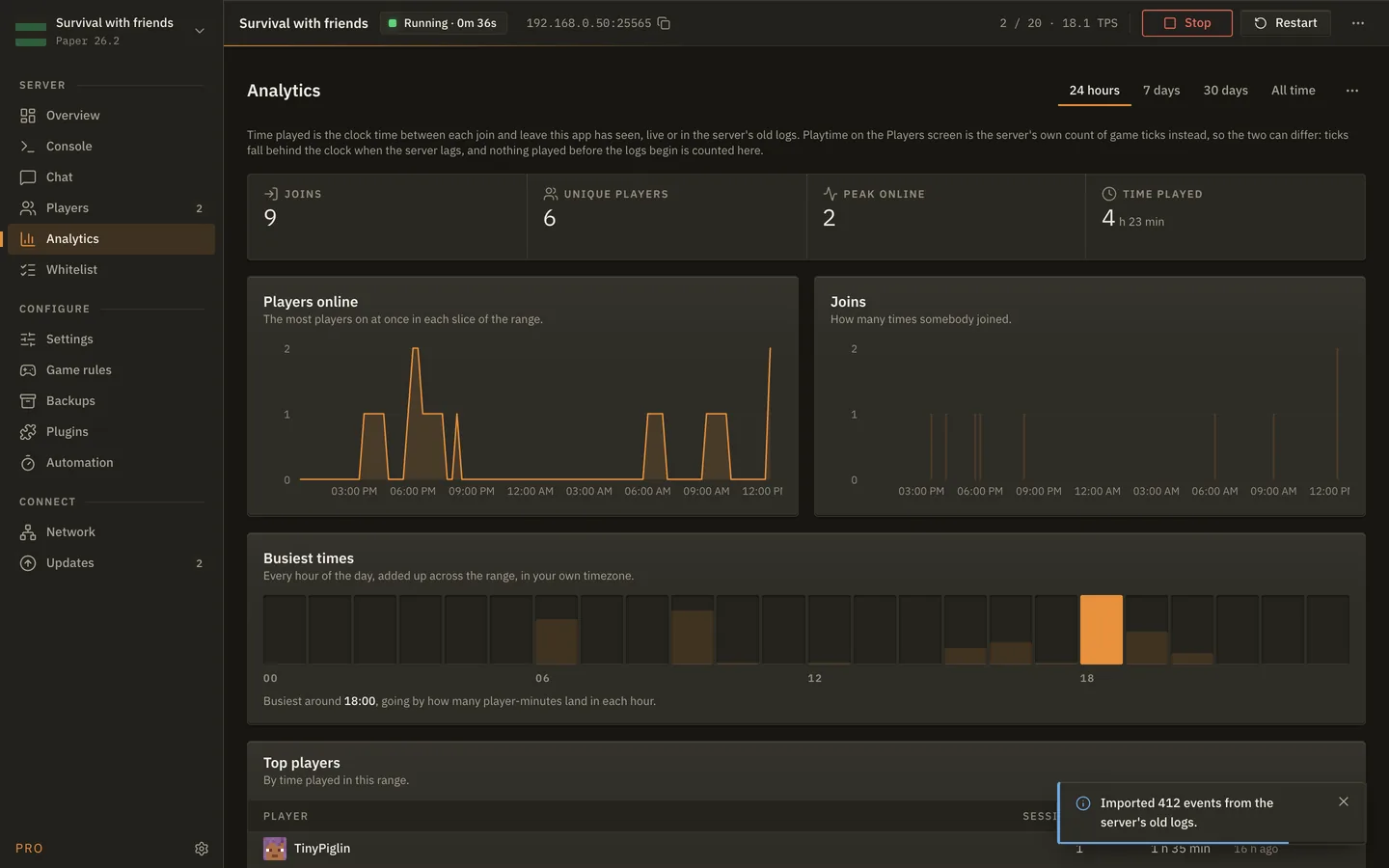
Analytics: How busy it really is.

Players online over time, when people actually play, who plays most, for the last day, week, month or all time. Built from the panel's own log of joins and leaves, with the server's older logs imported once.

The Analytics screen of MineServer Admin
DesktopBrowser

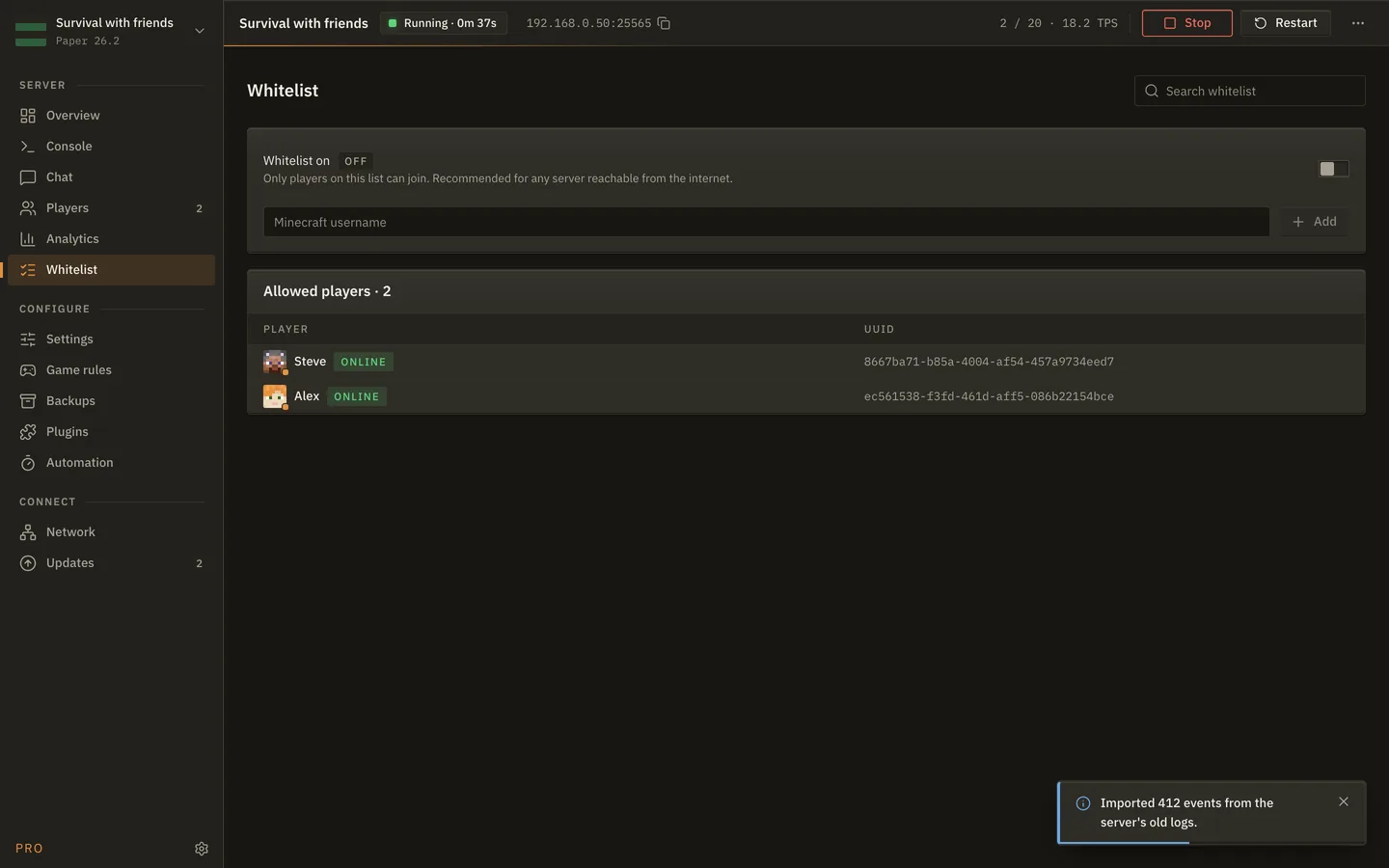
Whitelist: Your list, applied live.

Turn the whitelist on, add and remove names, and see who is on it, all while the server runs. No restart and no editing JSON.

The Whitelist screen of MineServer Admin
DesktopBrowser

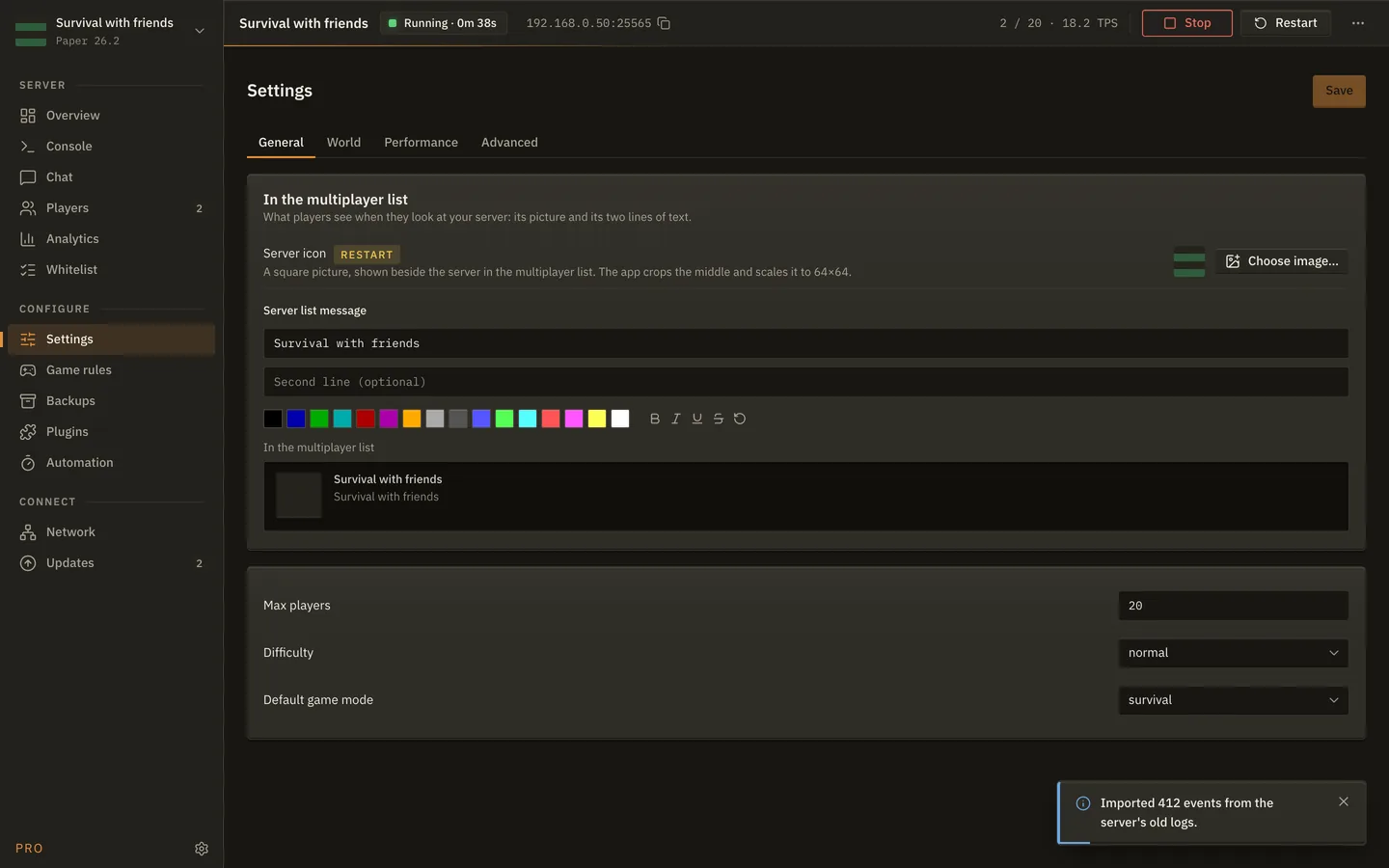
Settings: The properties file, without the file.

Difficulty, game mode, PvP, max players, view distance, the MOTD in colour with a preview, and the server icon. Applied live where the server allows it, otherwise saved and flagged restart required.

The Settings screen of MineServer Admin
DesktopBrowser

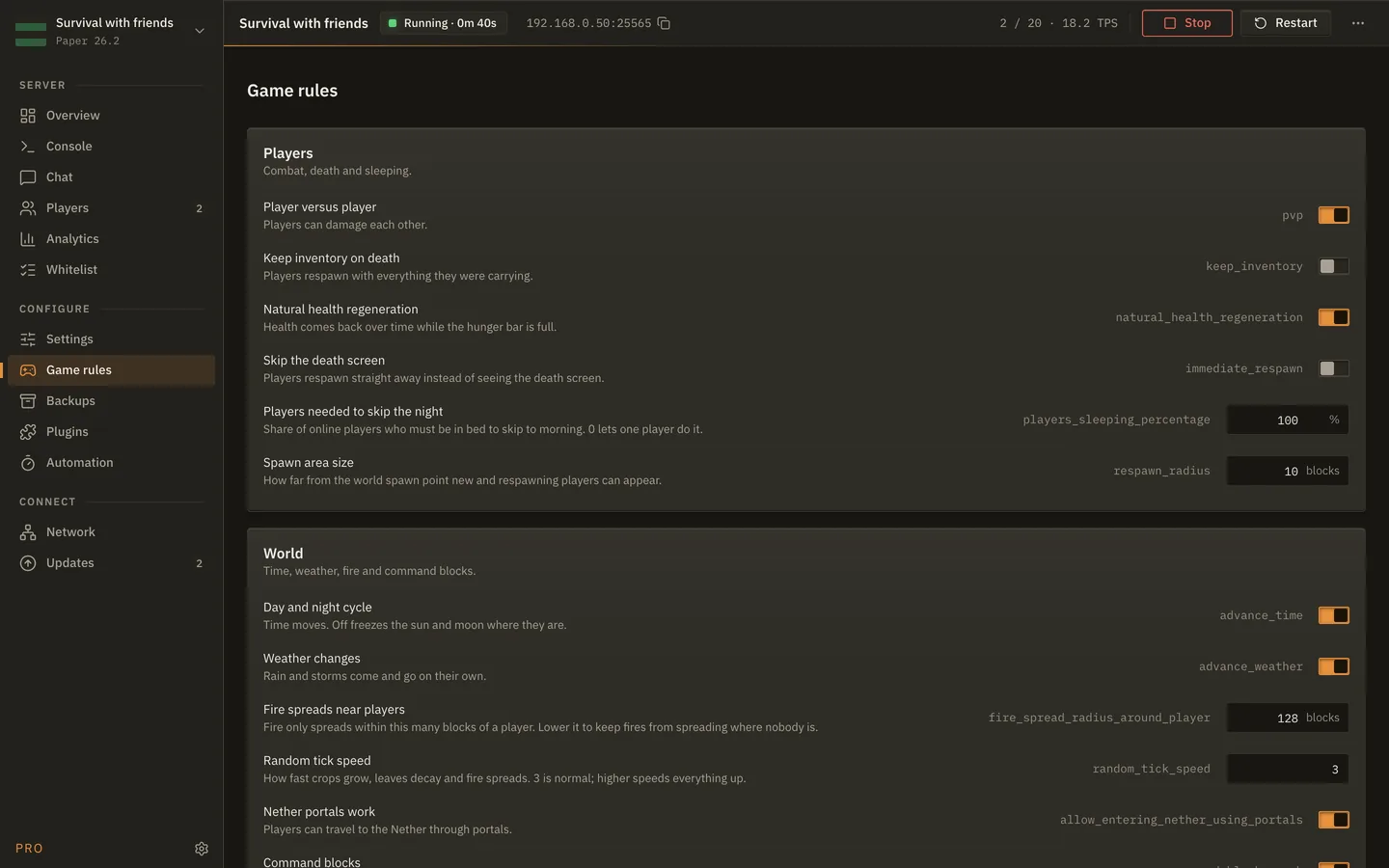
Game rules: The rules people actually change.

Keep inventory, mob griefing, daylight cycle, fire spread, command blocks and the rest, as toggles and numbers with a line on what each one does. Applied live.

The Game rules screen of MineServer Admin
DesktopNot in the browser: a mod inside the server cannot zip the machine it runs on, and the panel stores no files.

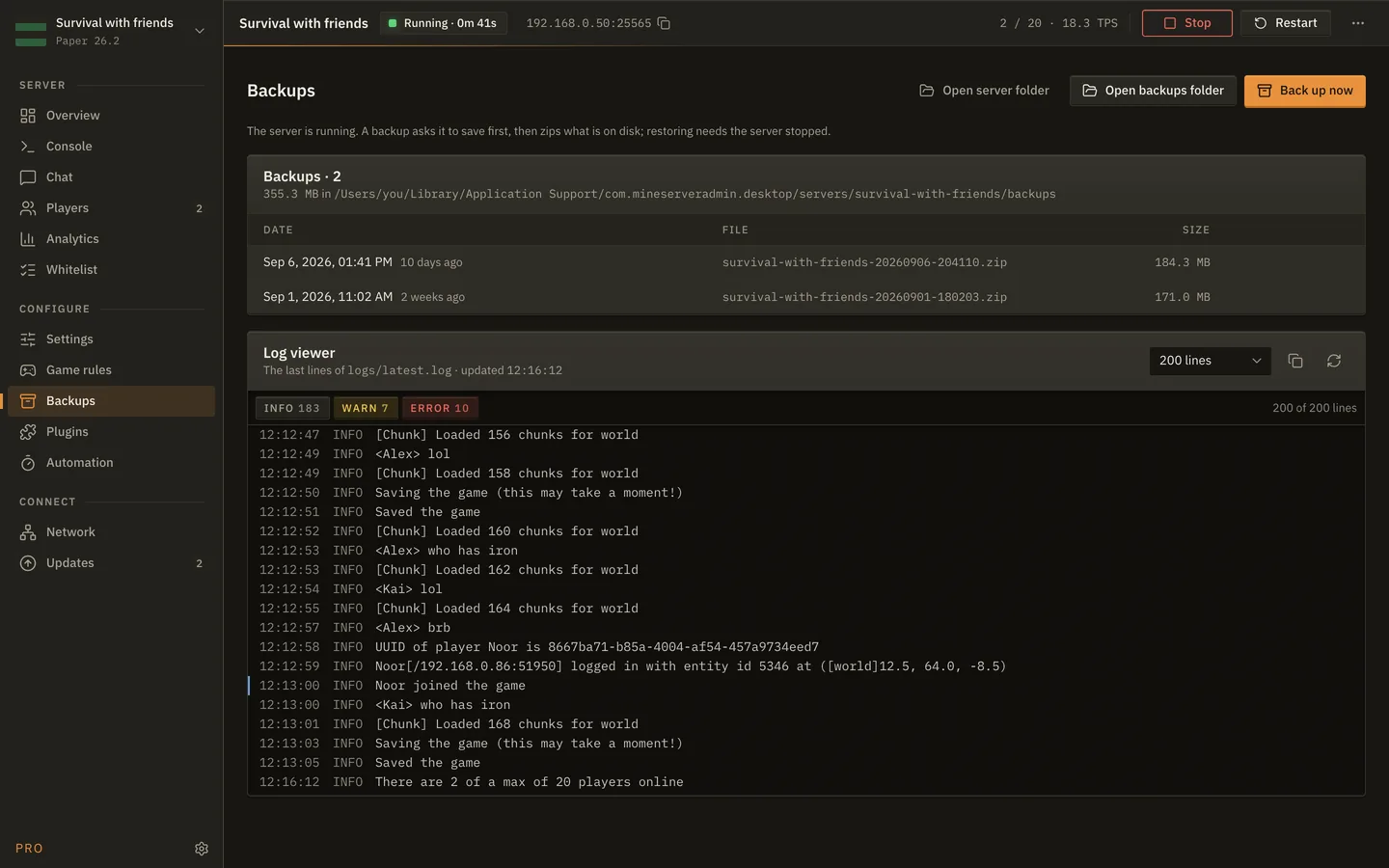
Backups: One click, one zip.

Back up the world into the server folder, restore an older one, open the folder, and read the latest log without leaving the app. The server is asked to save first.

The Backups screen of MineServer Admin
ProDesktopBrowser

Plugins: Plugins and mods, kept in order.

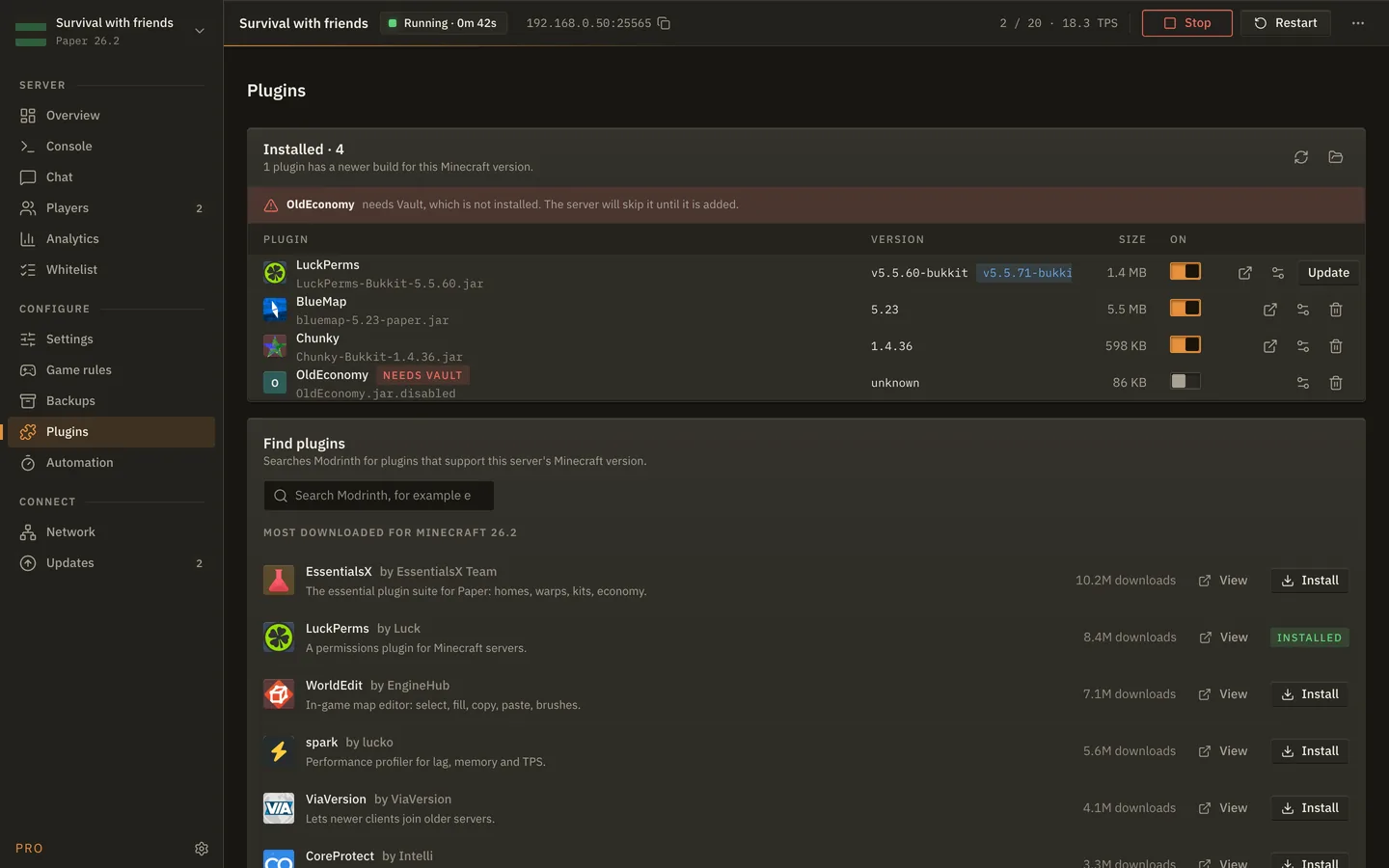
Installed plugins or mods with version, size and an on/off switch. An update is offered only when a build exists for your Minecraft version, a missing dependency is flagged before the server skips it, and a Modrinth search installs with one click.

The Plugins screen of MineServer Admin
ProDesktopBrowserScheduled backups on the desktop only.

Automation: Runs while you're away.

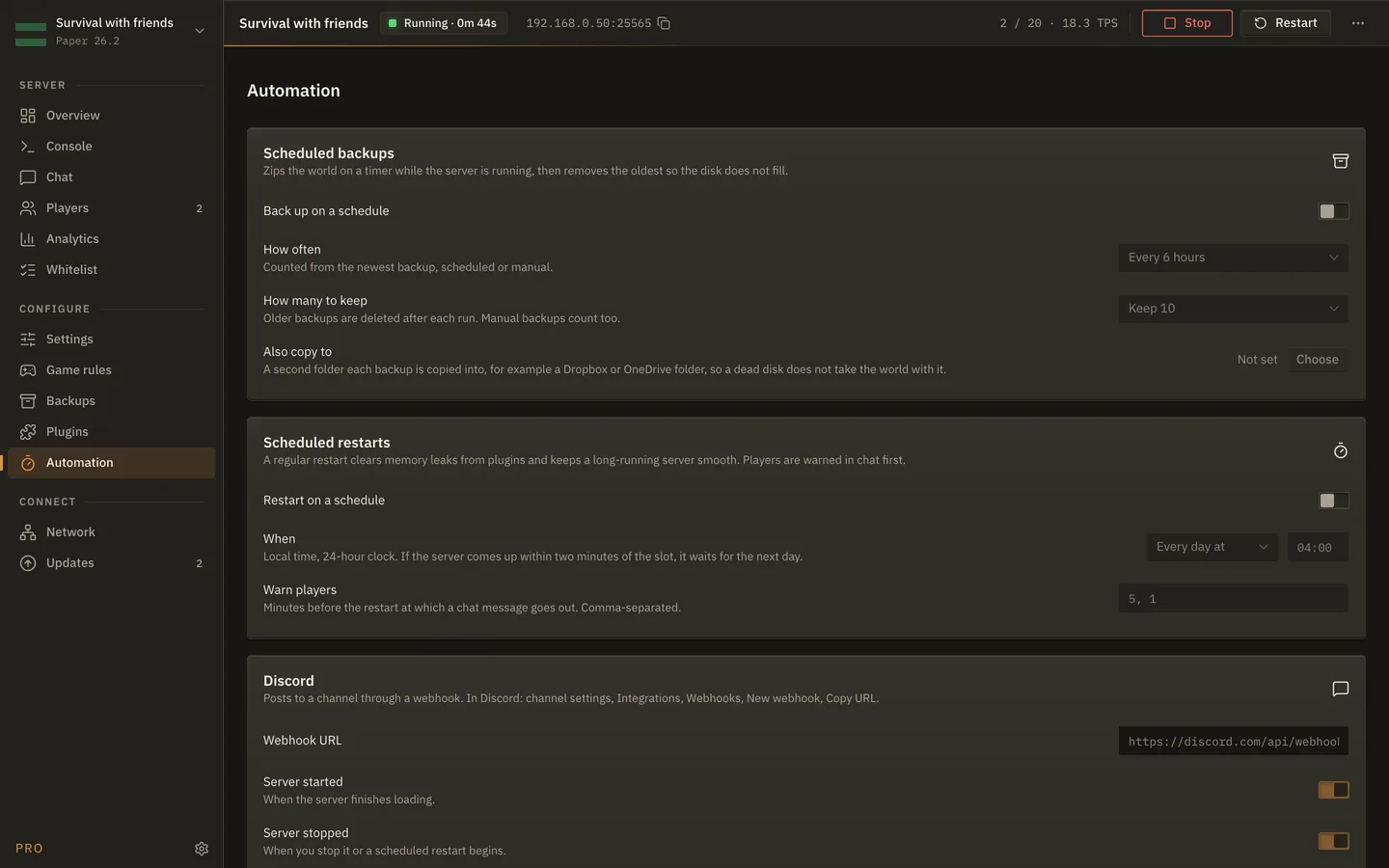
Scheduled restarts with chat warnings before they happen, and Discord alerts for starts, stops, crashes, joins and leaves. On the desktop, scheduled backups with a keep count and a second copy folder.

The Automation screen of MineServer Admin
DesktopBrowserThe browser checks whether the address is reachable; tunnels stay on the desktop.

Network: How friends get in.

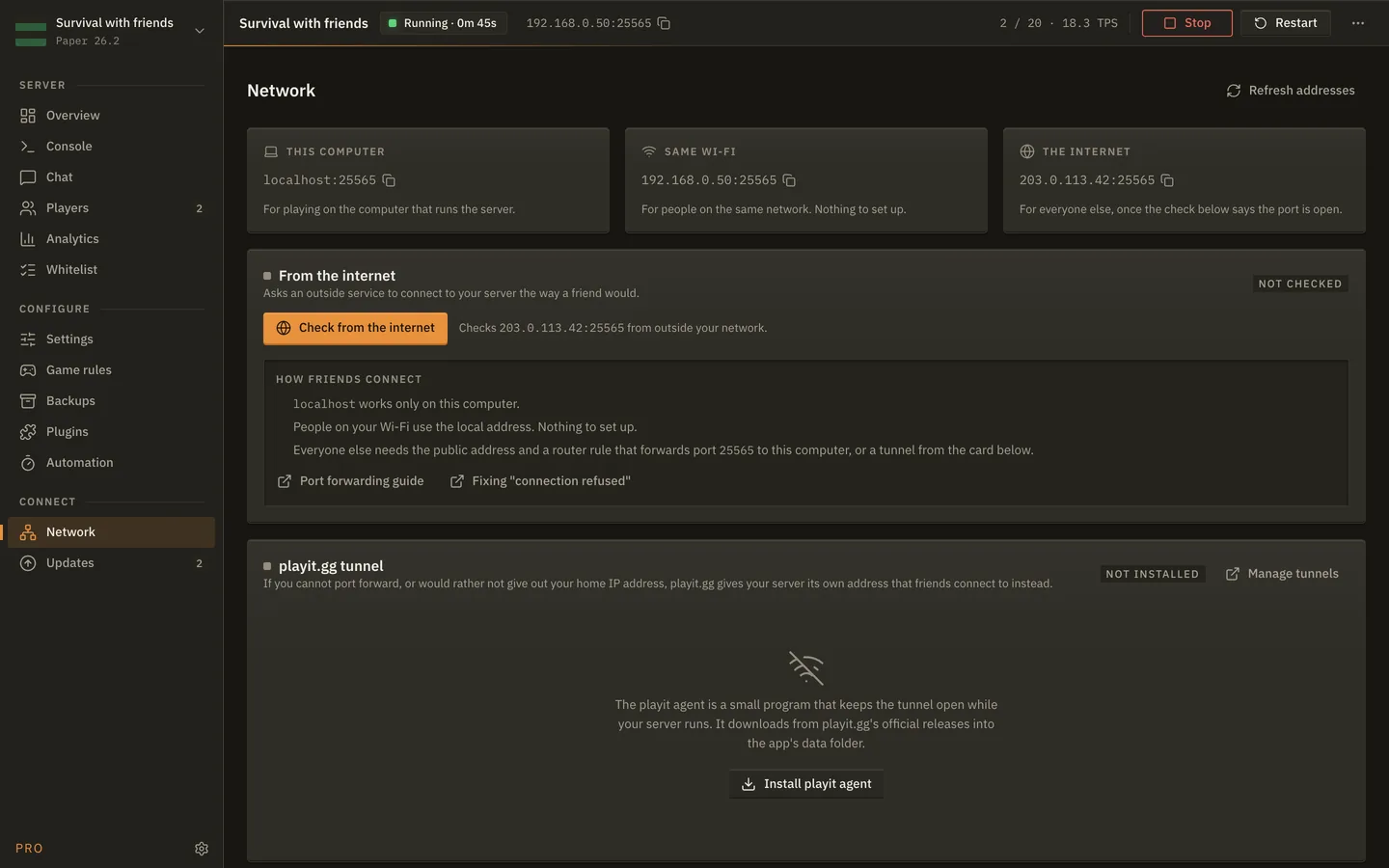
The three addresses that matter: this computer, your Wi-Fi, and the internet. An outside check tells you whether the port is open, and a playit.gg tunnel is there if you can't port forward.

The Network screen of MineServer Admin
DesktopBrowserThe browser shows what is newer and whether your plugins are ready; applying it is the desktop's or your host's job.

Updates: Newer builds, explained.

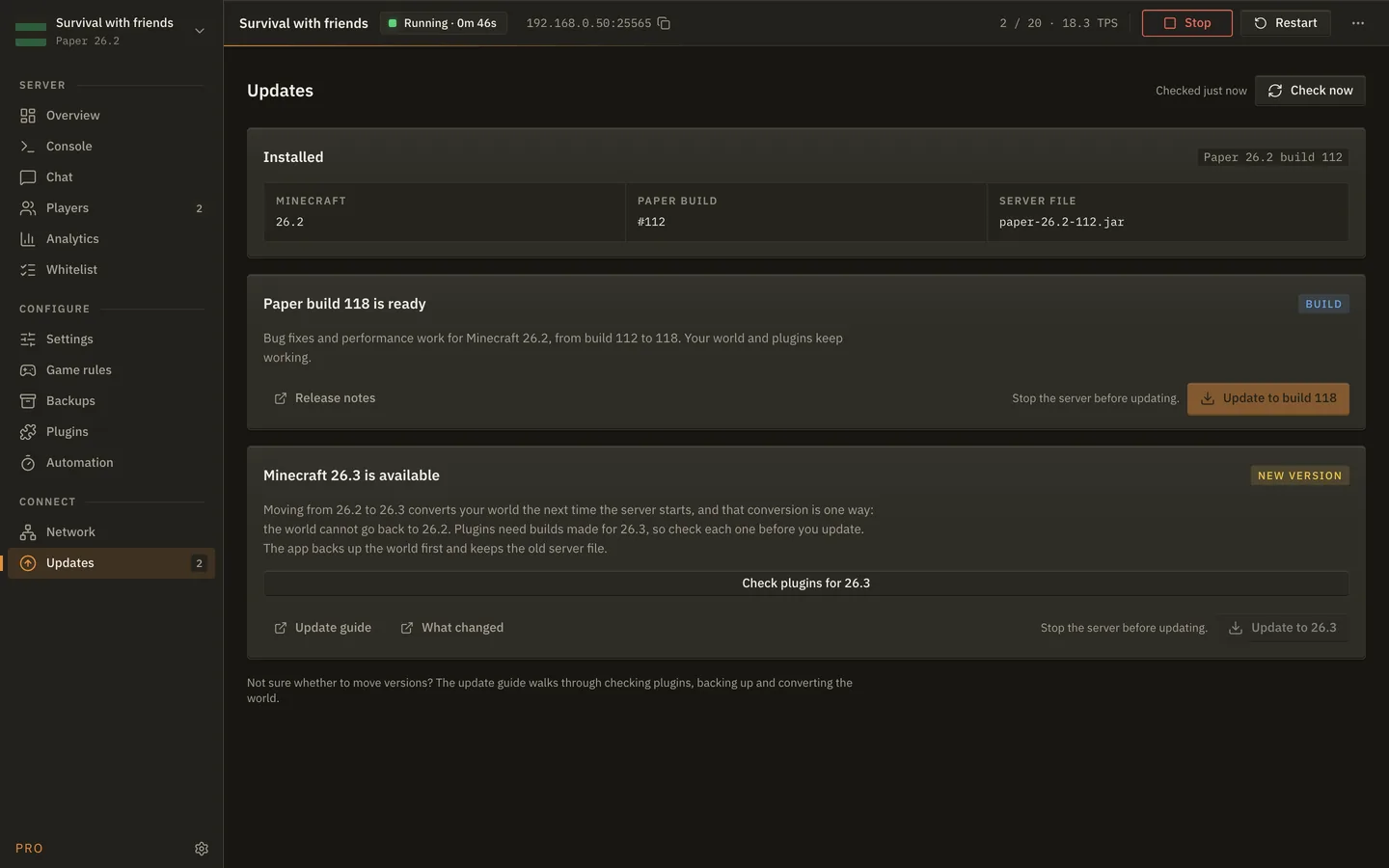
A newer Paper build, a newer Fabric or NeoForge loader, or a new Minecraft version, with what it means for your world. Plugins are checked against the new version before you move, and the world is backed up first.

The Updates screen of MineServer Admin
BrowserWeb panel only. On the desktop the server is yours alone.

Members: Share a server without sharing a password.

Invite somebody by email and choose what they can do. An operator runs the server day to day; a viewer sees everything and changes nothing. Every action anybody took is in the audit log, with who and when, and the mod's own token can be rotated if you ever think it has been seen.

The Members screen of MineServer Admin
Pricing

Free for one server. One small monthly plan for everything else.

We don't host servers, so there is nothing to meter and no hosting bill from us. Free is the whole panel for one server. Pro is a small monthly subscription for the person running more than one, with people helping, or who wants the plugin manager and the automation. The price is announced at launch.

Phone · Browser · Desktop app

Free

$0 One server. Sign in with your email; no card, no trial clock.

The whole panel for the server you have: console, chat, players, whitelist, settings, game rules, analytics, network and updates, from wherever you are.

  • One server, connected through the plugin or run by the desktop app
  • Every core screen, on your phone, in a browser and in the desktop app
  • Sign in with a link, a passkey or an authenticator app
  • 30 days of analytics history and 7 days of audit log
ProPhone · Browser · Desktop app

Pro

Monthly, announced at launch Cancel any time. Nothing is deleted when you do.

For the server you keep, and the people who help you keep it. Everything in Free, plus the parts that turn a panel into a team's tool.

  • More servers on one account
  • Members with roles: owners, operators and viewers, with an audit log of who did what
  • Plugins and mods from Modrinth, with platform-correct builds and dependency checks
  • Scheduled restarts with chat warnings, and Discord alerts
  • Update readiness checks before a new Minecraft version
  • Unlimited analytics history and 90 days of audit log

One plan covers all three ways in: the same account unlocks Pro on your phone, in a browser and in the desktop app. If you stop paying, servers past the free count go read-only until you are within it, and everything else keeps working on Free. Your worlds and files are never on our side to begin with: the plugin talks to the panel, and the panel stores no backups.

Questions

The things people ask before they try it.

Does MineServer Admin host Minecraft servers?

No. MineServer Admin is a control panel, not a host. Your server stays with the hosting provider you already pay, or on your own computer. A small plugin inside the server connects it to the panel, and nothing of yours is moved or stored by us.

Is MineServer Admin free?

Yes, for one server. Free includes the whole panel for that server: console, chat, players, whitelist, settings, game rules, analytics and updates, from your phone, a browser or the desktop app. Pro is a small monthly subscription that adds more servers, members with roles, the plugin and mod manager, automation and longer history.

Do I need the desktop app to use the web panel?

No. The web panel connects to a server through a small mod inside it and needs nothing on your computer. The desktop app never needs an account. Link the two and a server the desktop app runs shows up in the browser as well.

Which hosting providers does the web panel work with?

Any host that lets you upload a file and restart the server: Multicraft, Pterodactyl and Pelican panels, and hosts with panels of their own. If your host has no console, the pairing code goes in a file instead of a command.

Which server software is supported?

The desktop app sets up and runs Paper, Vanilla, Fabric and NeoForge. The web panel's mod has a build for Paper, Fabric and NeoForge; a Vanilla server cannot load a mod, so it is run from the desktop app.

Does the mod expose my server to the internet?

No. The mod makes one outbound connection to the panel, the way a browser does. There is nothing to port forward, and the panel never needs your server's address.

Does the web panel take backups?

No. A mod inside the server cannot zip the machine it runs on, and the panel stores no files of yours. Your host's own backups still apply, and the desktop app backs up servers it runs on your own computer.

Is Pro a subscription?

Yes, a small monthly one, and you can cancel any time. Nothing is deleted when you do: servers past the free count go read-only until you are within it, and everything else keeps working on the free plan.

When is MineServer Admin out?

No date yet. The free plan comes first, then Pro. Leave your email and you'll get one message the day it lands.
In development

Be first to run it.

The free plan is being finished now; Pro follows. Leave your email and you'll hear the day it's ready.